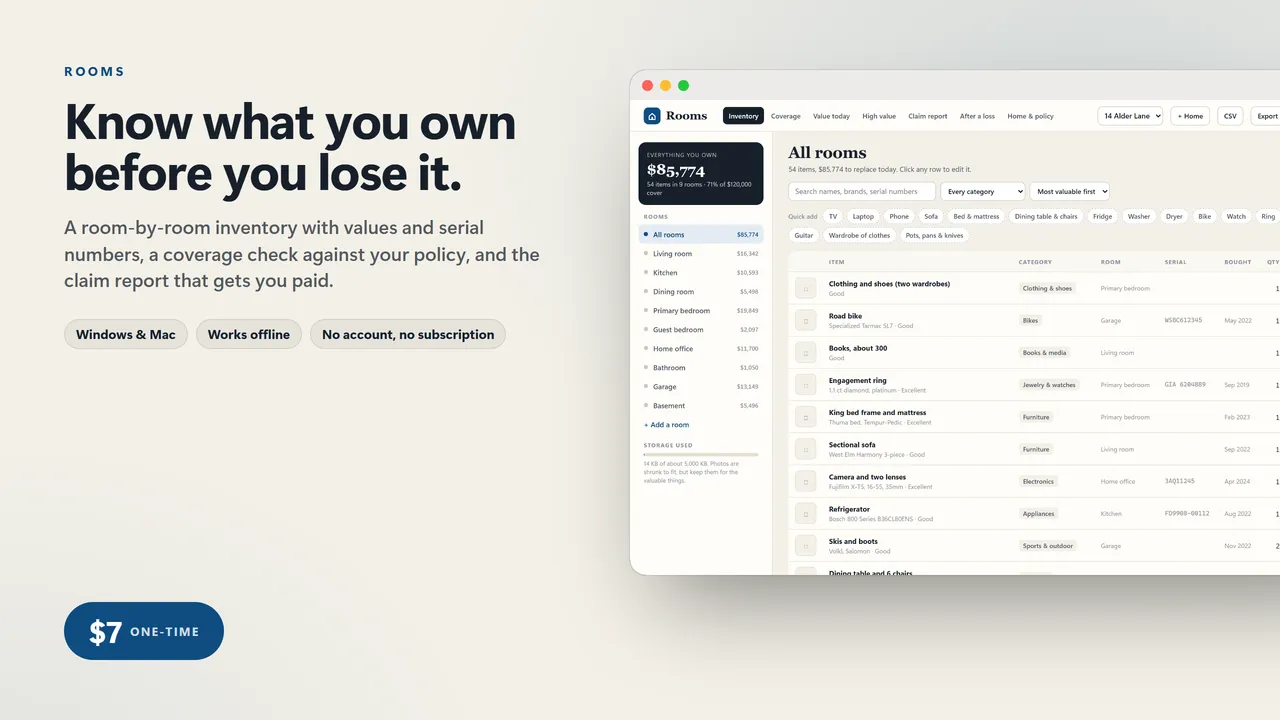
Know what you own before you lose it.
After a fire, a burst pipe or a burglary, the insurer sends a form: list everything you lost, what it cost, when you bought it, the serial numbers, and proof. People sit at a kitchen table trying to remember what was in the garage. Insurers and consumer groups have said for years to make the list in advance. Almost nobody does, because the free apps cap you at 50 items or push a subscription, and a spreadsheet does not tell you whether you are covered.
Rooms is the list, plus the two checks that matter.
WHAT IT DOES
- Room-by-room inventory: name, category, brand and model, serial number, quantity, purchase date, what you paid, what it costs new today, condition, where the receipt is, notes and a photo
- Quick add chips for the common things (TV, laptop, sofa, bed, fridge, washer, bike, watch, ring, power tools) with typical replacement values filled in
- Photos are shrunk to fit the file, with a storage meter so you always know how much room is left
- Coverage check: everything you own against your contents cover, and each capped category (jewelry, cash, firearms, art, silver) against its cap, with a red flag and the amount you are over
- Value today: replacement cost against actual cash value with editable useful life per category, so you know what an actual-cash-value policy would not pay
- High value list: everything over $1,000 or in a capped category, flagged where the serial number, proof or photo is missing
- Claim report: every item by room with all fields, photos, totals and a signature line, printed or saved as a PDF
- After a loss checklist: one printable page covering the first day, the first week and before you sign anything
- Search, filters, sort, room totals, several homes, CSV export, backup and restore
- Any currency
Who it's for
Homeowners and renters who have been meaning to do this since they moved in. Anyone with a policy that caps jewelry at $1,500 and a ring worth more than that.
What you get
- Rooms (one .html file, runs in your browser, offline)
- A 2-page quick-start guide
Good to know
- One file. No install, no account, no subscription, no internet needed after download.
- Your data stays on your computer. Export a backup any time; import it on another machine.
- Built for a computer screen: Windows or Mac, in Chrome, Edge, Safari or Firefox.
- Instant download.
What's inside the download
- Rooms.html
- Quick-Start-Guide.pdf

Made by Matthew Busel, a one-person studio in Tuckahoe, NY. About me. Questions: support@tensorust.com.
Home, family and school
Rooms
home inventory for insurance: everything you own, room by room, with serial numbers, values, the coverage gaps and the claim report adjusters ask for
After a fire, flood or burglary the insurer asks for a list of everything you lost, with what it cost, when you bought it and the serial numbers. Almost nobody has one. Rooms is that list: walk through each room, add what you would have to buy again, and it tells you whether your cover is enough, which categories your policy caps (jewelry, cash, firearms), and prints the claim report. One file, offline, no account.
Works or I fix it. If a file doesn't open or work as described, email support@tensorust.com within 30 days and I fix it or send a working copy. All sales are final, so check the screenshots or ask first.
- Updated
- Oct 2026
- File
- ZIP, 320 KB: 1 HTML app, 1 PDF
- Who it's for
- Homeowners and renters who have been meaning to do this since they moved in. Anyone with a policy that caps jewelry at $1,500 and a ring worth more than that.
One-time price in US dollars, checkout by Stripe. After paying you land on a page with your download link. Each link works for 15 minutes, and reopening that page makes fresh ones.
- Rooms-Home-Inventory.zip