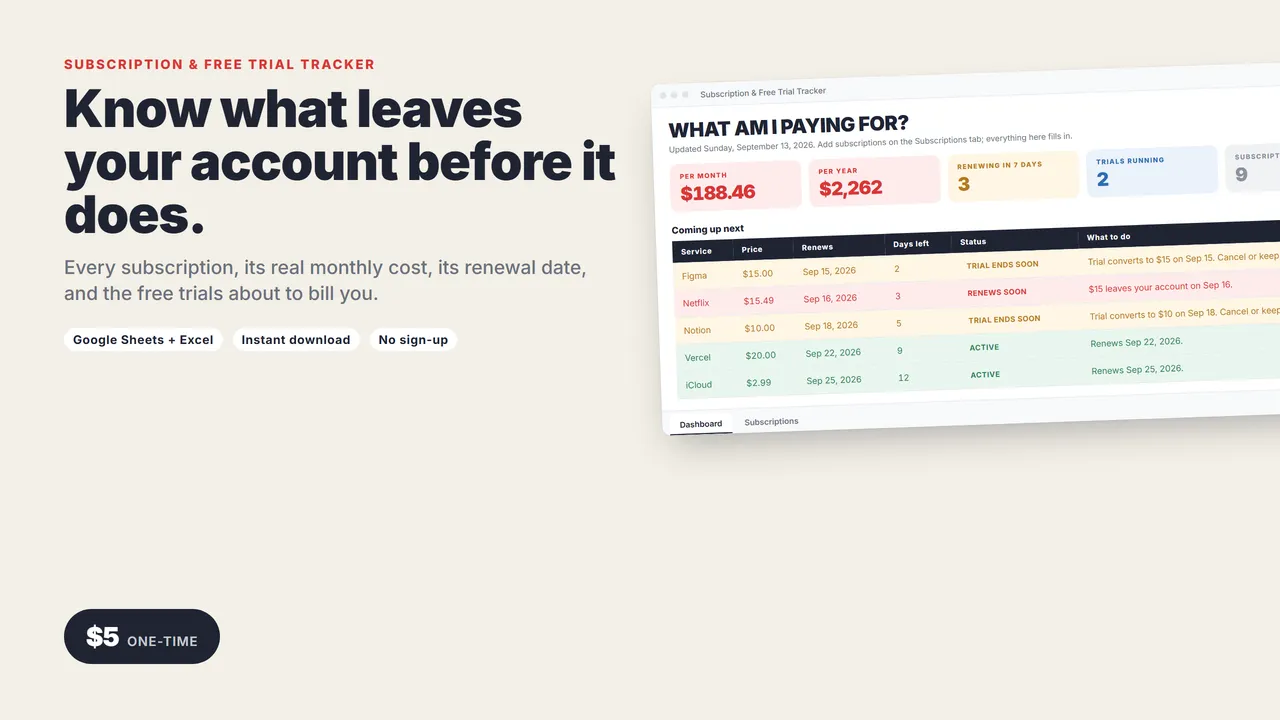
Know what leaves your account before it does.
Every subscription in one place: what it costs, how it is billed, when it renews, and which free trials are about to turn into real charges.
Not an app that wants your bank login. One spreadsheet that works in Google Sheets and Excel.
WHAT AM I PAYING FOR?
- Per month and per year, with yearly plans spread out properly
- Renewing in 7 days: what is about to leave your account
- Trials running: the ones you meant to cancel
- Coming up next, soonest first, with the amount and a plain next step
- Biggest first, when it is time to cut
Every row gets a status automatically
ACTIVE, RENEWS SOON, TRIAL ENDS SOON, or DATE PASSED, with the number of days left and what to do.
What you get
- The tracker (.xlsx, opens in Google Sheets or Excel): Dashboard and Subscriptions tabs, room for 200 subscriptions
- A 2-page quick-start guide. Setup takes five minutes.
Good to know
- No macros, add-ons, bank connections or sign-ups.
- Works in Google Sheets (free) and Excel 2016 or newer.
- Instant download.
Need a custom app built for your business? I build native iOS apps and web tools from prototype to launch. Services and pricing · LinkedIn
Money and business
Subscription & Free Trial Tracker
Google Sheets + Excel
Every subscription, what it costs per month and year, when it renews, and which free trials are about to start charging you.
One-time price in US dollars, checkout by Stripe. After paying you land on a page with your download link. Each link works for 15 minutes, and reopening that page makes fresh ones.
- Subscription-Tracker.zip