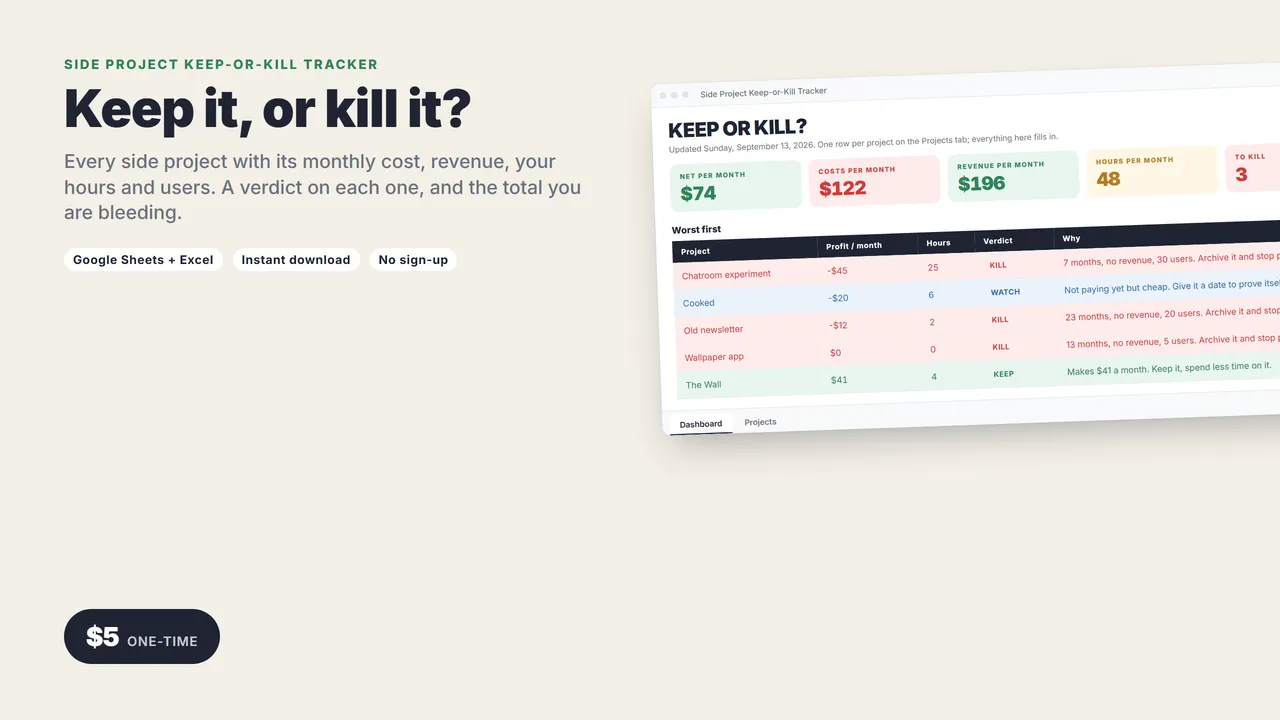
Keep it, or kill it?
You have nine side projects. Two make money, three cost money, and four you have not looked at since March. This spreadsheet gives each one a verdict.
One row per project: cost, revenue, your hours, users. It works out profit, what you have spent so far, what your time is earning, and says KEEP, WATCH, TIME SINK or KILL, with the reason in one sentence.
Works in Google Sheets and Excel.
THE DASHBOARD
- Net per month across every project
- Costs, revenue and your hours per month, totaled
- How many are marked KILL
- Worst first, and best first
THE VERDICTS
- KEEP: it makes money. Spend less time on it.
- WATCH: not paying yet but cheap. Give it a date.
- TIME SINK: 20+ hours a month for nothing. Cut the hours or set a deadline.
- KILL: six months old, no revenue, under 50 users. Archive it and stop paying.
What you get
- The tracker (.xlsx): Dashboard and Projects tabs
- A 2-page quick-start guide
Who it's for
Indie hackers, serial side-project starters, anyone paying for hosting on things nobody visits.
Good to know
- No macros, add-ons or sign-ups. Works in Google Sheets (free) and Excel 2016 or newer.
- Instant download.
Need a custom app built for your business? I build native iOS apps and web tools from prototype to launch. Services and pricing · LinkedIn
Indie dev and launch
Side Project Keep-or-Kill Tracker
Google Sheets + Excel
Every side project with its monthly cost, revenue, your hours and its users. It tells you which ones to keep, which to watch, and which to kill.
One-time price in US dollars, checkout by Stripe. After paying you land on a page with your download link. Each link works for 15 minutes, and reopening that page makes fresh ones.
- Side-Project-Keep-or-Kill.zip